From:
http://www.thedigitalshift.com/2013/02/k-12/flying-twice-as-high-reading-rainbow-2-0-slj-talks-with-levar-burton/
Check out the app trailer here:
http://www.youtube.com/watch?v=855-3B3s208
Flying Twice as High: Reading Rainbow 2.0 | SLJ Talks to LeVar Burton
By
Karyn M. Peterson on
February 12, 201
From 
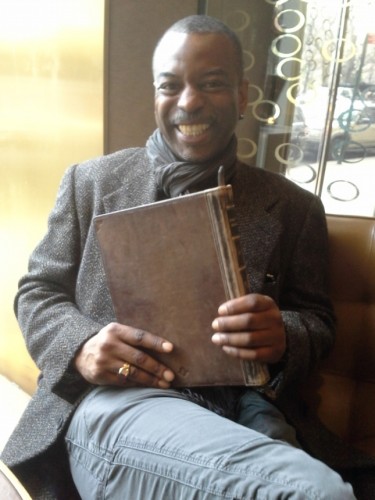
LeVar Burton shows off his book-themed iPad case during our interview at the Essex House Hotel in NYC, February 6, 2013.
Thirty years after its debut, most of us can still remember every
word of the theme song and hum its melody. That’s the legacy of, and the
power behind, the
Reading Rainbow brand, says LeVar Burton,
host and executive producer of the original Peabody Award-winning PBS
television series and now co-founder of its reiteration as a
subscription-based tablet app. Burton’s
RRKidz launched
the app late last year exclusive to the iPad—but that’s only the very beginning of the brand’s rosy future, he tells
School Library Journal.
We sat down one-on-one with Burton, Curator in Chief of RR Kidz, last
week at New York City’s historic Essex House Hotel while he was in town
to promote the miniseries-themed episode of the PBS series
Pioneers of Television alongside fellow
Roots actors Louis Gossett Jr., Leslie Uggams, and Ben Vareen.
Over a pot of green tea, Burton took time out of his busy schedule to give
SLJ
an interactive demo of the new app and to chat candidly about
children’s literacy; what’s next for the Reading Rainbow brand as it
eyes expansion to other platforms, devices, and the Web; his ongoing
mission to create lifelong readers; and his efforts to advocate for
access to books and technology for all kids.
You’ve said previously that Reading Rainbow was the hardest, most rewarding thing you’ve done in show business. Is that still true for you?
I had to learn a new business. I had to learn the technology business.
This is the hardest thing I’ve ever done in my life. When you think
about reinventing a well-known and beloved brand, the thing that kept us
up nights was the fear of failing to meet expectations. This is the
hardest thing I’ve ever done…and the most rewarding. I love that I am
able to focus at this point in my life on the mission, the continuing
mission, of getting kids excited about literature and reading.
After the show was cancelled, did you immediately know you wanted to re-launch the brand?
It was a result of the outcry. That’s when [business partner] Mark and I
looked at each other and recognized, ‘Wait, there’s thirst out there
for the brand.’ So we knew we were going to do something with the brand,
and we knew it wasn’t television. We knew it was in the digital space,
but we didn’t know what it was. We thought Web, we thought virtual
world. But when the iPad came out, it was like, ‘Holy moley! Now, we
don’t have to search for a vertical, we
have the vertical.’
Reading Rainbow is about the exploration of literature, quality
literature for kids that is tied to the real world. Bingo.
So creating a new version of the TV show wasn’t considered?
Reading Rainbow, when we [started as] a television show, it was
about using the prevailing technology of the day to steer kids back in
the direction of the written word. That technology happened to be TV. In
the 80s, that’s where kids were hanging out. Today? Not so much.
Television is just one screen that they interact with during the course
of the day.
What was your favorite episode of the show, or new video that you have filmed for the app?
Which is your favorite niece or nephew? We did so many cool things! I learned to fly a plane. I learned to scuba dive.
We are the only people ever to film the changing of the guard
ceremony at the Tomb of the Unknown Soldier in Washington, DC. They let
us take our cameras into the old guard quarters underneath the tomb,
where that special regiment of soldiers prepares. They let us into the
Bureau of Printing and Engraving, where we make our nation’s money. They
let me in with my camera! We’re
Reading Rainbow! I think we have earned that kind of access because we earn that kind of respect.
Being the host of
Reading Rainbow is the best job in the universe. And that comes from the man who was the chief engineer of the
Enterprise.
Is there a book you featured on the show that was special, that you think all kids should read?
Amazing Grace [by Mary Hoffman, Penguin,1991]. Why? Because it is an opportunity to talk to kids about the value of your own unique identity.
Can you tell us about your experience with Jimmy Fallon (who
once performed the theme song in the style of Jim Morrison, and
interviewed Burton on air for the debut of the app)?
We made history! We debuted this app on the Jimmy Fallon show. No one
has ever done that before—you promote your book, you promote your movie,
your television series. It was the first for an app. Jimmy and his
sister are huge fans.
PBS impacted my generation so much, but that’s not necessarily true of today’s generation of kids. Do you agree?
Exactly. I love that you brought up PBS. When we were growing up, our
parents knew that they could put us in front of the TV and turn on PBS
and walk out of the room, knowing that they didn’t have to know the name
of the show, they just knew that it was good for you. My dream for RR
Kidz is that we become like a PBS for parents in the digital realm.
Can you tell us about the new app and what it offers kids?
At this point, we have over 250 books and over 30 videos, and we add
three new books and one video every week, because it’s a subscription
model and we have to continually refresh the content. And we also
announced our partnership with
National Geographic Kids.
I narrate about 12 percent of the titles, and I have handpicked the
rest of the storytelling team. They’re storytellers that I know.
We know the kids want the bells and whistles; that’s why these
devices are so engaging, because they’re interactive. So we have spent
an awful lot of time thinking about what way we wanted those
interactions to be. When you are in the ‘read to me’ mode, you’ll see a
prompt [to control movement of features on the screen] but in the ‘read
by myself’ mode, you have access right away; you’re in control of the
environment. So that’s something that’s really, really important.
The idea is that it is about adventuring, exploring, and finding books that you want to read.
The way each book is displayed and handled on the platform
seems very carefully planned. Can you tell us more about the process of
bringing books into the app?
[It’s] very, very purposeful. Every decision that you see reflected in
the app has been incredibly—to the best of our ability—incredibly well
thought out.
One of the challenges is the different format sizes of books and
fitting them all in. The iPad is not letterboxed, so it’s an odd size,
so there have been a gajillion (actual count, a gajillion) problems we
have had to solve in putting this together.
We have a team now of 11. We built a tool to convert PDFs into books.
We’re acquiring a tool now to inject new content—already made digital
books—into our distribution platform which is, after all, what we are.
We’re a distribution platform for books, videos, and games. There’s a
game in every book, in that there’s a matching game at the end of every
book using the book’s original art.
Have you tabled some books that you would really like to feature?
Yes! We’re waiting for our technology to improve. Absolutely. And guess what? It will.
Has it been difficult to get the book rights from the publishers for the new app?
It’s gotten a lot easier. We went to the publishing
companies and I said, ‘Look, you know me. You know how I feel about
children’s literature. I know this is all really new and scary for
y’all. I’m here to help you in a couple of ways. Number one, we want to
convert your book, and we want to test this out. Now you are our launch
partners. Give us your book. We will treat them as if they were our own,
with the same respect that we did on the television series. Also, we
know that you or anyone who is producing a digital children’s book these
days has a basic and fundamental problem of discovery. In a sea of
millions of apps, how do you get your book, your app seen? We’ve got a
pretty well-known brand featuring quality children’s literature and we
have a brand ambassador, which is our unfair advantage.’ [laughs]
At the moment, the iPad is the only device that is widely accessible for those with disabilities.
For now. At this very now moment, yes. But that’s going to change, so rapidly.
So once other devices catch up, Reading Rainbow will expand to them?
We’re coming out on an Android platform very, very, soon. We haven’t
made the official announcement yet but the platform partner we will be
announcing is a market leader.
As you know, our audience is librarians. Are you familiar with that group and the work they do getting books into the hands…
…of kids! And getting the right book into the hand of the right kid.
Yes! See it’s the librarian who sees the kids on a regular basis and
gets to know a little about the kid and can really point the child in
the right direction, because a librarian is always trying to serve the
needs of the reader. So that element of curation that is so important to
us.
We feel like we are helping kids find the right books for them, and
in that sense we have that same goal, that same mission in common with
teachers and librarians.
You know, I want to speak to ALA, and we had a big meeting yesterday
at the NY Public Library, so we are looking at some initiatives that
will move us in that direction.
Recent studies show that many kids are reading ebooks on
desktop computers. Beyond Android devices, will the app be available on
the Web?
Yes! Yes! We’re going to have a Web version. Sooner rather than later.
This app is [only] our first product. We have a team of 11 so we’re
stretched a little thin right now…please know that the Web version is
very much on my mind.
What are your goals in terms of universal access and library
access? Not necessarily what’s in the works already, but what would you
like to see?
I want this app to be ubiquitously available. And I know in order for
that to happen we need to be A. platform agnostic and B. there have to
be more tablets in the marketplace at affordable price points.
Won’t these kinds of changes take an exceptionally long time?
That’s because there’s a larger issue, isn’t there? The larger issue is
the public will—and the private will—to get it done. If we fail to put a
tablet computer in the hands of every child on this planet, we will
have failed our responsibilities as the elders of this generation. That
means that everybody, all the stakeholders, have to come to the table.
All of the stakeholders. I mean the Apples, and the Samsungs and everybody. And the U.S. [Department of Education].
Have you been working with teachers, the D.O.E, towards this goal?
Believe me, teachers are very much on my mind. I have regular
conversations with [U.S. Secretary of Education] Arne Duncan. He is
acutely aware of the government’s need to shift its priorities. I’ll say
it, because he can’t: We’ve spent far too much money on the machinery
of war over the last decade and a half. We have sacrificed at least one
generation of American children because they have not been educated,
according to a standard that America believes it should have. We have
spent a lot of time, through No Child Left Behind, teaching to the
test—as opposed to teaching to get kids turned on about learning. So
there are some real significant challenges to universal access. And it’s
not a question of which platform you’re on. It’s a question of, Do we
have the will, the political will, to get it done?
So you are looking at the issue from a top-down approach?
I’m trying to do whatever I can to advance this cause. My mother was an
English teacher. My older sister is a teacher. My son is in education,
as are both of my nieces and my cousin. Education is the family
business—and because I happen to have this platform, this bully pulpit,
I’m going to use it.
Here’s the bottom line for me: I genuinely believe we have the
ability to revolutionize the way we educate children. Seriously. It’s
right there. And here’s how: Every culture on the planet has a tradition
of storytelling. Take whatever information you want to disseminate, be
it language, science, news, whatever. Embed it in storytelling, in the
storytelling idioms that are native to the child. Put those interactive
stories on tablet devices and we
will revolutionize the way we teach children in this world.


 Toca Train